
For its stress-free setup and low latency technology, the Elgato Cam link has become an industry favorite among streamers.
The Cam link performs practically the same job as a conventional capture card, however, the portable design features no HDMI output or any audio inputs. As a result, this makes it better suited for users wanting to broadcast their live footage via a high-end camera (and not their screens gameplay).
Sadly, not everyone can afford this nifty little gadget.
Here are the 10 best alternatives at a fraction of the price.
What is the best Elgato Cam link alternative?
10. BlueAVS Capture Card
Pass-through: 4K30fps
Record Resolution: 1080p | Frame rate: 30fps
USB: 3.0
The BlueAVS Capture Card is a highly-rated device with an impressively low price tag. It allows broadcasters to pass-through Ultra HD at 30fps (or Full HD at 60fps), and works by connecting to your DSLR, camcorder, or action camera to your computer.
Once connected, it is a fast and effective way to broadcast a stream. It requires no external power output or drivers and is simply plug in and play. You will then have the chance to open up OBS, or a similar third-party software to have full control over your HD content.
The BlueAVS card is perfect for Twitch streamers who are looking to broadcast their footage from a compact and portable device. It is one of the cheaper options on the market but its quality makes this little cam-link a suitable alternative to the Elgato.
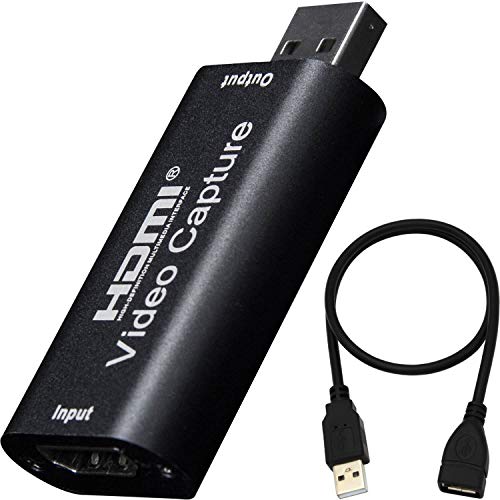
- Support input max resolution 3840×2160@60Hz, output max resolution 1920×1080@30Hz
- Easily connect your DSLR, camcorder, or action Cam to your PC or Mac
- Real-Time Feedback, Shoot and produce within your favorite tools
- Record videos directly to the hard disk without time delay
Prices pulled from the Amazon Product Advertising API on:
Product prices and availability are accurate as of the date/time indicated and are subject to change. Any price and availability information displayed on [relevant Amazon Site(s), as applicable] at the time of purchase will apply to the purchase of this product.
9. Guermok Video Capture Card
Pass-through: 4K30fps
Record Resolution: 1080p |Frame rate: 60fps
USB: 3.0
The Guermok HDMI Capture Card is another great option for broadcasters looking to produce HD footage at a very low cost. It supports an impressive maximum input pass-through of 4k30fps and can record in a maximum output resolution of 1080p 60fps.
The device offers impressive real-time previews and video recording straight onto the hard-disk. Thanks to it’s USB 3.0 port, you can record smoothly with a high-speed transmission, so you won’t have to worry about experiencing a delay when configuring the feed in OBS.
Besides OBS the Cleaso Capture Card works with a broad range of third-party software. Furthermore, it is supported by multiple operating systems including Windows, Linux, Android, and Mac OS. Due to its versatility and affordable price tag, your pocket will be happy with this useful device.

- 【1080P 60FPS Video Capture Card】 This HDMI game capture card is based on USB3.0 high speed transmission port, input resolution up to 4K@30HZ, output resolution up to 2K@30Hz or 1920×1080@60Hz.
- 【Ultra Low Latency Screen Sharing】 HDMI capture card is made of good quality aluminum alloy with strong heat dissipation, allowing you to enjoy ultra low latency while live gaming
- 【Plug and Play, Easy to Carry】 This HDMI 1080P video capture card does not require any additional drivers or external power supply, just plug and play for fast capture.
- 【Wide Compatibility USB Capture Card】 Easily streams to Facebook, Youtube or Twitch. With the connection, this HDMI to USB C/3.0 video capture devices can be working on several Operating Systems and various software
Prices pulled from the Amazon Product Advertising API on:
Product prices and availability are accurate as of the date/time indicated and are subject to change. Any price and availability information displayed on [relevant Amazon Site(s), as applicable] at the time of purchase will apply to the purchase of this product.
8. UCEC CAM NOVA Capture Card
Pass-through: 4K30fps
Record Resolution: 1080p | Frame rate: 60fps
USB: 3.0
This UCEC CAM NOVA is a popular device that offers high-quality, professional video streaming. It has a max capture input of 3840×2160 @30Hz and the max output is 1920×1080@ 60Hz, making it ideal for streamers wanting to convert their household cameras and other HDMI devices.
This device allows users to live stream, shoot, and use various tools with a minimal 10-15ms delay. Just like other Elgato Cam Link alternatives on this list, the setup is simple and requires no drivers for live streaming. Once hooked up, it lets you broadcast your finest moments in 1080p, 60fps.
The CAM NOVA capture card will ensure your streaming experience is fun and stress-free. It is a great choice for Twitch Streamers that are looking for professional video quality, high definition, and real-time feedback at a very competitive price.
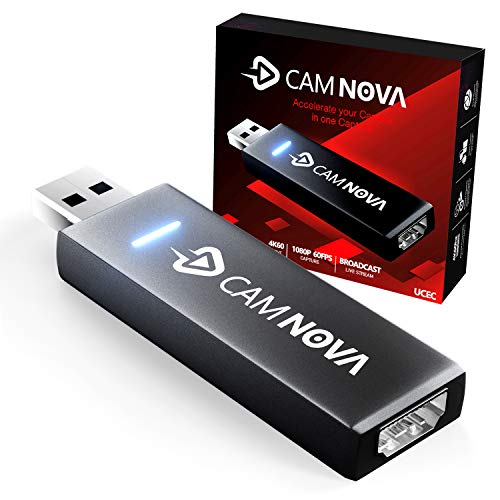
- EASY TO USE: Connect your DSLR,camcorder,or action cam to your PC or Mac. Record footage directly to your hard drive without time restrictions.
- HD DEFINITION: Input max resolution 4K60Hz, output max resolution 1920×1080 60Hz.
- LIVE STREAM AND RECORD: Record and share your Live show , TV shows , Live game ,Movies, music, video, audio, photo,
- PLUG AND PLAY: Coupled with CAM NOVA video capture device, Capture on HDMI Resolution, your camera appears as a webcam in all your favorite apps,
Prices pulled from the Amazon Product Advertising API on:
Product prices and availability are accurate as of the date/time indicated and are subject to change. Any price and availability information displayed on [relevant Amazon Site(s), as applicable] at the time of purchase will apply to the purchase of this product.
7. IPXOZO HDMI Capture Card
Pass-through: 4K30fps
Record Resolution: 1080p | Frame rate: 60fps
USB: 3.0
The IPXOZO HDMI Capture Card allows streamers to broadcast their high-definition video through an HDMI connection. Its features an impressive 4k pass-through at 30fps, and is compatible with a variety of operating systems; such as Windows, Linux, and Mac.
In terms of the design, this alternative is very similar to the Elgato Cam Link. It plugs in via a single USB 3.0 input on one end and has an HDMI input on the other. Being a UVC device, there are no drivers to download so you can expect a simple and stress-free setup prior to plugging it in.
For performance, the video capture is surprisingly fast, making it suitable for a wide range of applications. Unfortunately, unlike the Cam Links ability to record at 4K 30 fps, you are limited to recording in at 1080p 60fps, being one of the main reasons it retails at approx $100 less.

- 【Wide compatibility with Multiple Systems】: The HDMI capture card is suitable for Windows 7/ 8/ 10, Mac OS X 10.9 or above, Linux and many other systems.
- 【ZERO Latency USB 3.0 HDMI LOOP-OUT】:Based on the high-speed USB 3.0 technology, there is ZERO latency when you use the HDMI pass-through port to transmit live streaming to Twitch,
- 【Plug & Play, No Need to Install Drivers】:The 4K HDMI video capture card meets UVC and UAC standards, just plug & play, no need to install drivers.
- 【Upgraded 1080P@60fps HD Quality】: The audio video capture card can capture one single channel HD HDMI video signal, capture resolution up to 1920x1080@60fps (1080p).
Prices pulled from the Amazon Product Advertising API on:
Product prices and availability are accurate as of the date/time indicated and are subject to change. Any price and availability information displayed on [relevant Amazon Site(s), as applicable] at the time of purchase will apply to the purchase of this product.
6. CaptureC – 4K Capture Card
Pass-through: 4K60fps
Record Resolution: 1080p | Frame rate: 60fps
USB: 3.0
The CaptureC video capture card provides a cost-effective solution to your live streaming problems. At less than half the price of the Elgato Cam Link, you might be initially skeptical, however, it’s fully capable of capturing 4K gameplay in 1920×1080 (1080p) @ 60fps.
What we like most about this card is that it’s incredibly easy to get started with. No drivers or extra software are needed during installation, and instructions are written in plain English. Simply plug in the device, wait for it to automatically configure, and within 5 minutes you’ll be broadcasting.
The unit itself is very light and portable. It comes in a brushed aluminum case with soft, rounded edges and it does not require any external power supply. After opening the box, you will find the inclusion of two USB 3.0 cables, as well as a Type-A to Type-C cable for newer devices.
This device has an HDMI output so you can also use it for streaming games.

- ✔?【HDMI Capture Card 1080PIt can capture one HDMI 4Kp60 input, output HDMI 4Kp60 and USB 1080p60 signals. The HDMI video capture meets UVC and UAC standard, without having to install drivers.
- ✔?【Capture Card for Streaming】Compatible with most gameplay consoles,Webcam,Camera,DSLR, be real-time streaming on Tiktok/Twitch/Youtube/OBS/XSplit/Potplayer/Potplayer/VLC more easily with your gameplay.
- ✔?【High Resolution& Zero-Lag Passthroug】:Capture card for nintendo switch, 300-350MB/s throughput and it is compatible with USB 2.0. The process of video and audio is done by the dongle and will not occupy the CPU.
- ✔?【Mic Input & Audio Video Output】:Capture card for streaming, support HDMI loop output 4Kp60. Support HDMI 2.0b and HD 2.2. Support MIC input and audio output.
Prices pulled from the Amazon Product Advertising API on:
Product prices and availability are accurate as of the date/time indicated and are subject to change. Any price and availability information displayed on [relevant Amazon Site(s), as applicable] at the time of purchase will apply to the purchase of this product.
5. ZasLuke Video Capture Card
Pass-through: 4K30fps
Record Resolution: 1080p | Frame rate: 60fps
USB: 3.0
At less than $50, the ZasLuke Capture Card is undoubtedly one of the best budget options for live streaming. Capable of broadcasting high quality 1080P 60fps video-capture, it works like a charm with all devices including Camcorders, Consoles, and DSLR’s.
The slender design is easy to install and carry, which makes it ideal for high definition streaming and video recording. It requires no drivers to function, and the USB 3.0 technology also acts as a dedicated power supply.
This capture card is highly compatible with gaming and supports all HDMI inputs found on your DSLR, PS4, and Xbox One. It appeals to gamers who want to share their footage online, but are not prepared to miss out on capturing their screen at the most familiar resolution and frame-rate.
For a fraction of the price, you won’t be disappointed.

- 【4K HDMI Game Capture Card】: This game capture card supports 4K@60 fps 4:4:4 for HDMI 2.0 input (output is 1080P) which is ideal for live broadcasts,
- 【USB 3.0 HDMI Video Capture Card】: Based on the high-speed USB 3.0 technology, it can capture one single channel HD HDMI video signal.
- 【1080P 60fps HD Quality】: The game capture card supports up to 1920x1080@60fps (1080p) video up and down conversion with no CPU interaction.
- 【HDMI Loop-out】: HDMI Loop-out: The HDMI loop-out port is very useful, the USB3.0 high-speed transmission port makes it easier for you to transmit live streaming.
Prices pulled from the Amazon Product Advertising API on:
Product prices and availability are accurate as of the date/time indicated and are subject to change. Any price and availability information displayed on [relevant Amazon Site(s), as applicable] at the time of purchase will apply to the purchase of this product.
4. StarTech 4K Capture Device
Pass-through: 4K30fps
Record Resolution: 1080p | Frame rate: 60fps
USB: 3.0
Able to capture and transfer resolutions up to 4K (at 30 fps), the picture quality from this Elgato Cam Link alternative is top-tier. 4K resolution gives you four times the sharpness, clarity, and color of 1080p resolutions which is it’s a great choice for streaming and capture projects.
Thanks to the hardware “under the hood”, StarTech can connect 4K HDTVs, monitors, and projectors to devices that wouldn’t natively support 4K on their own. This makes it easy to extend or mirror 1080p displays to 4K displays without any degradation in quality or increases in lag and latency.
The use of high-speed USB 3.0 connectivity guarantees lightning-fast data transfer, too. This also improves performance, cuts down on lag and latency, and boosts the stability of this capture card when it is handling a heavier workload.
All of the software necessary to run this hardware is built into the capture card itself. As soon it is connected to a computer (Mac or Windows-based) it immediately begins the installation process. The most up-to-date drivers are installed and it is ready to go from there.
- CREATE A DUAL MONITOR WORKSTATION: Use this USB 3.0 to HDMI converter to connect your Windows or Mac laptop / desktop to a secondary monitor, HDTV or projector using an available USB 3.0 port
- PLUG & DISPLAY: This DisplayLink certified dongle, provides automatic driver installation updates to your Windows (7 / 8 / 10) enabled computers.
- 4K RESOLUTIONS: With support for resolutions up to 4K 30Hz and widescreen capabilities this USB 3.0 external video & graphics card delivers a full UHD experience, ensuring astonishing picture quality
- MULTI USE FUNCTIONALITY: Use this IT-grade USB 3.0 display adapter (backward compatible with USB 2.0) to either extend or mirror your main laptop or desktop display
Prices pulled from the Amazon Product Advertising API on:
Product prices and availability are accurate as of the date/time indicated and are subject to change. Any price and availability information displayed on [relevant Amazon Site(s), as applicable] at the time of purchase will apply to the purchase of this product.
3. PENGO 4K Grabber
Pass-through: 4K60fps
Record Resolution: 1080p | Frame rate: 60fps
USB: 3.0
The Pengo 4K Grabber is a sleek, elongated capture card that closely resembles the Elgato Cam Link. It has a high dynamic range (HDR) pass-through that allows you to capture your display up to 4k60p, and record in a max resolution of 1080p, 60 fps.
Unlike most conventional capture cards that have both an HDMI input and output, the Pengo follows a similar design to the Elgato Cam Link. One HDMI input can be found on the front and then on the back is a USB 3.0 output that’s ready to plug straight into your PC.
The easy to configure setup makes this device a breeze to work with. It requires no external power supply or additional drivers and powers straight from the USB. To start capturing high-definition video and audio with minimal latency, simply connect it to your computer.
Overall, it’s another top option that performs a very similar function.
- ?Supports 4K @ 60 fps 4:4:4 video output and captures audio/video HDMI source. Unlike no other. Plug-n-play, no driver or external power needed.
- ?Input resolution: 640x480p, 1280x720p, 1920x1080p, 3840x2160p, 4096x2160p. Video Sampling: 4:4:4 format. Output Color Space: YUY2 (4:2:2), RGB (4:4:4) MJPG.
- ?Output resolution: Up to 4096x2160p @ 60 Hz via HDMI. Up to 1080p @ 60 Hz via USB. Audio Input: HDMI, 16-bit PCM encoded audio at 32kHz, 44.1kHz, 48kHz, 96kHz, and 192kHz sampling rates
- ?Pengo 4K HDMI grabber with minimal to zero lag video capture for a live streamer.
Prices pulled from the Amazon Product Advertising API on:
Product prices and availability are accurate as of the date/time indicated and are subject to change. Any price and availability information displayed on [relevant Amazon Site(s), as applicable] at the time of purchase will apply to the purchase of this product.
(The image is the HDMI model).
2. Razer Ripsaw X Cam Link
Pass-through: 4K60fps
Record Resolution: 4K | Frame rate: 30fps
USB: 3.0
Live streamers, podcasters, and content creators have fallen in love with the Razer Ripsaw X. A big part of that is the full native support for 4K resolutions up to 30 fps. 1080p video can be streamed at 60 fps, too. Every frame is captured in stunning high definition regardless of the resolution selected.
This capture device is super compact and lightweight. It connects via HDMI 2.0 to your camera set up and then feeds captured content through to your computer via USB 3.0. This not only guarantees smoothness in what it captures, but it also eliminates a lot of latency problems that can contribute to “fuzzy” visual fidelity issues.
One of the coolest features of the Razer Ripsaw X is that it can provide footage that goes straight to your streaming software without any go-between. You can say goodbye to latency and resolution problems forever. It makes a perfect solution for live streamers and content creators that stream consistently.
Content creators will also be glad to know that the Razer offers tight integrations with most streaming software solutions. It’s easy to adjust video resolution, modify frame rates, and start or stop camera capture activities through these software options without a lot of headache or hassle.

- 4K 30FPS Capture: Stream crisp video quality in 1080p 60 FPS or up to 4K 30 FPS with DSLRs.
- HDMI 2.0 and USB 3.0 Connectivity: Capture every moment in real-time with lightning-fast HDMI 2.0 input and USB 3.0 connectivity.
- Straight To Your Stream: Create freely by storing footage directly on your hard drive when recording or connect to popular streaming software.
- Compatible with Popular Streaming Software: Adjust video resolution and tweak frame rates.
Prices pulled from the Amazon Product Advertising API on:
Product prices and availability are accurate as of the date/time indicated and are subject to change. Any price and availability information displayed on [relevant Amazon Site(s), as applicable] at the time of purchase will apply to the purchase of this product.
1. AVerMedia Live Streamer Cap 4K
Pass-through: 4K60fps
Record Resolution: 4K | Frame rate: 30fps
USB: 3.0
The AVerMedia Live Streamer is the closest alternative you’ll find to the Elgato cam link. Featuring almost identical pass-through and record resolution capabilities, it provides support for up to 4Kp30 captures, can handle Full-HD HDR natively, and has true plug and play capabilities.
Flexibility is a huge priority for the Live Streamer. With this bit of kit, you can connect to pretty much any modern Webcam imaginable. This includes being able to hook it to DSLR cameras, camcorders, and other video capture hardware, too. It takes about three seconds to connect to different sources.
The AVerMedia Live Streamer utilizes advanced artificial intelligence to improve camera-streaming capabilities, too. The internal AI features auto framing, face, and speech tracking, and makes pan and zoom directions effortless. Combine that with the ultralow latency even while recording in 4K resolutions and this hardware becomes a no-brainer.
Best of all, you don’t need to worry about any special drivers or software to make the most of this hardware. It works on Windows and OS X devices right out of the box. You can also use it with any capture software you like, including Elgato software options.

Prices pulled from the Amazon Product Advertising API on:
Product prices and availability are accurate as of the date/time indicated and are subject to change. Any price and availability information displayed on [relevant Amazon Site(s), as applicable] at the time of purchase will apply to the purchase of this product.
How to choose the best Elgato Cam Link Alternative in 2026
Elgato Capture cards are extremely popular and tend to be a safe bet. However, if you’ve had a bad experience with Elgato or want to find one that’s cheaper, here are some things you should look for when buying an alternative cam link.
Pass-Through
If you want something that has similar specs to Elgato, then it needs to have decent pass-through capabilities. The Elgato Cam-Link 4k is capable of 4k30fps. Some of the top options on our list have a comparable pass-through of 4k30 frames per second.
Record Resolution
You want an excellent record resolution as well. If you’re running a Twitch Stream, you don’t want a heavily pixelated or grainy view of yourself on some 720p cam. The Elgato has a 4K resolution, so you will want something to match it pound for pound.
Compatibility
Of course, if you want to record in 4K, your camera has to be able to shoot in 4K resolutions, too. For example, we highly recommend the Logitech Brio 4K webcam. Before you jump on an Elgato competitor, you’ll want to check for camera compatibility.
Ease of Use
Part of what makes Elgato Cam-Link so popular is the device’s ease of use. It’s nearly at the level of plug-n-play, then off you go. If you want something that’s comparable to Elgato, pay attention to the reviews and do some extra homework before you pick a competitor brand.
Price
The Elgato is pretty popular but it is also on the expensive side. That’s what makes budget devices so intriguing because they cost considerably less. Many of them are nearly a carbon copy of the Elgato Cam-Link 4k.
Frequently Asked Questions
Why do I need a Cam Link?
The Elgato Cam Link is a USB device that allows you to broadcast your HDMI footage in real-time. Thanks to the ultra-low latency technology, it turns your DSLR camera, camcorder, or action cam into a professional webcam.
Is the Elgato Cam Link a capture card?
The Elgato Cam Link is a capture card, however, unlike conventional capture cards, It does not feature an HDMI output. For this reason, there is no display pass-through. Therefore, if you want to use it for games consoles you’ll have to play off the OBS preview screen.
Can you use a Cam Link as a capture card?
Yes, but due to having no passthrough, you would have to play your game from the OBS preview, which might result in a slight delay. To avoid the delay (and use the device more like a conventional capture card), you can connect the Cam link to an HDMI splitter.
We hope you found this post useful on the best Elgato Cam link Alternative.
Click here for a list of Streaming Essentials to get you started on Twitch!
Click here for the best Budget Capture Cards!